Deploy a full-stack app with Sistemo
Three machines on a private network: PostgreSQL, a Node.js API, and Nginx serving a frontend. All on your machine with full isolation.
Your machine
├── localhost:8080 -> web machine (Nginx + static frontend)
├── localhost:3030 -> api machine (Node.js + Express)
│   └── db machine (PostgreSQL)     <- api connects here
└── Private "app" network -- DB only from inside machines, not on host
Time: ~10 minutes. Requirements: Linux with KVM, Docker installed, sistemo running.
Step 1: Create the network
sistemo network create appAll three machines join this network. They can reach each other by IP, but are isolated from other machines on your host.
Step 2: Deploy the database
We deploy a plain Debian machine and install PostgreSQL inside it — just like you would on a real server. This shows the power of sistemo: it's a real Linux machine with apt, systemd, and full package management.
sistemo machine deploy debian --name db --network app --memory 1G --storage 4GSSH in and set up PostgreSQL:
sistemo machine ssh dbInside the machine:
# Install PostgreSQL
apt update && DEBIAN_FRONTEND=noninteractive apt install -y postgresql

# Find config files (path varies by version)
PG_CONF=$(find /etc/postgresql -name postgresql.conf | head -1)
PG_HBA=$(find /etc/postgresql -name pg_hba.conf | head -1)

# Allow connections from the network
echo "listen_addresses = '*'" >> "$PG_CONF"
echo "host all all 0.0.0.0/0 md5" >> "$PG_HBA"

# Restart and create the app database
systemctl restart postgresql
su - postgres -c "psql -c \"CREATE USER app WITH PASSWORD 'appsecret';\""
su - postgres -c "psql -c \"CREATE DATABASE appdb OWNER app;\""

# Verify
ss -lntp | grep 5432
exit
Note the db IP for later:
sistemo machine status db | grep IP
# Example: IP: 10.201.0.2
Step 3: Build and deploy the API
Create a simple Express API that connects to PostgreSQL:
mkdir -p /tmp/demo-api && cd /tmp/demo-api

cat > server.js << 'ENDJS'
const express = require("express");
const { Pool } = require("pg");
const app = express();
const pool = new Pool({ connectionString: process.env.DATABASE_URL });

app.get("/api/health", (_, res) => res.json({ status: "ok" }));
app.get("/api/visits", async (_, res) => {
  try {
    await pool.query("CREATE TABLE IF NOT EXISTS visits (id SERIAL, ts TIMESTAMP DEFAULT NOW())");
    await pool.query("INSERT INTO visits DEFAULT VALUES");
    const { rows } = await pool.query("SELECT COUNT(*)::int AS total FROM visits");
    res.json({ total: rows[0].total });
  } catch (err) { res.status(500).json({ error: err.message }); }
});
app.listen(3000, "0.0.0.0", () => console.log("API on :3000"));
ENDJS

cat > Dockerfile << 'EOF'
FROM node:20-slim
WORKDIR /app
COPY server.js .
RUN npm init -y && npm install express pg
CMD ["node", "server.js"]
EOF

docker build -t demo-api .
Build the machine image and deploy:
sudo sistemo image build demo-api
sistemo machine deploy demo-api --name api --network app --memory 512M --expose 3030:3000
Now SSH into the API machine and create a systemd service so it starts automatically and survives restarts:
sistemo machine ssh apiInside the machine (replace DB_IP with the actual IP from step 2):
cat > /etc/systemd/system/api.service << 'EOF'
[Unit]
Description=Demo API
After=network.target

[Service]
Type=simple
WorkingDirectory=/app
Environment=DATABASE_URL=postgres://app:appsecret@DB_IP:5432/appdb
ExecStart=/usr/local/bin/node /app/server.js
Restart=always

[Install]
WantedBy=multi-user.target
EOF

# Replace DB_IP with actual IP (e.g. 10.201.0.2)
sed -i 's/DB_IP/10.201.0.2/' /etc/systemd/system/api.service

systemctl daemon-reload
systemctl enable --now api
systemctl status api
exit
Test from the host:
curl http://localhost:3030/api/health
# {"status":"ok"}

curl http://localhost:3030/api/visits
# {"total":1}
Step 4: Build and deploy the frontend
mkdir -p /tmp/demo-web && cd /tmp/demo-web

cat > index.html << 'EOF'
<!DOCTYPE html>
<html>
<head>
  <title>Sistemo Demo</title>
  <style>
    body { font-family: system-ui; max-width: 600px; margin: 60px auto; padding: 0 20px; }
    button { padding: 12px 24px; font-size: 16px; cursor: pointer; border-radius: 8px; }
    pre { background: #f4f4f4; padding: 16px; border-radius: 8px; }
  </style>
</head>
<body>
  <h1>Sistemo Full-Stack Demo</h1>
  <p>Each click writes a row to PostgreSQL through the API.</p>
  <button onclick="visit()">Count Visit</button>
  <pre id="result">Click the button...</pre>
  <script>
    async function visit() {
      try {
        const res = await fetch("/api/visits");
        const data = await res.json();
        document.getElementById("result").textContent = JSON.stringify(data, null, 2);
      } catch (e) {
        document.getElementById("result").textContent = "Error: " + e.message;
      }
    }
  </script>
</body>
</html>
EOF

cat > Dockerfile << 'EOF'
FROM nginx:stable
COPY index.html /usr/share/nginx/html/
EOF

docker build -t demo-web .
Build and deploy:
sudo sistemo image build demo-web
sistemo machine deploy demo-web --name web --network app --memory 256M --expose 8080:80
Configure Nginx to proxy API requests. SSH in and set up the reverse proxy (replace API_IP with the actual IP from step 3):
sistemo machine ssh webInside the machine:
cat > /etc/nginx/conf.d/default.conf << 'CONF'
server {
    listen 80;
    root /usr/share/nginx/html;

    location /api/ {
        proxy_pass http://API_IP:3000;
        proxy_set_header Host $host;
    }
    location / {
        try_files $uri /index.html;
    }
}
CONF

# Replace API_IP with actual IP (e.g. 10.201.0.3)
sed -i 's/API_IP/10.201.0.3/' /etc/nginx/conf.d/default.conf
nginx -t && nginx -s reload
exit
Step 5: Test the full stack
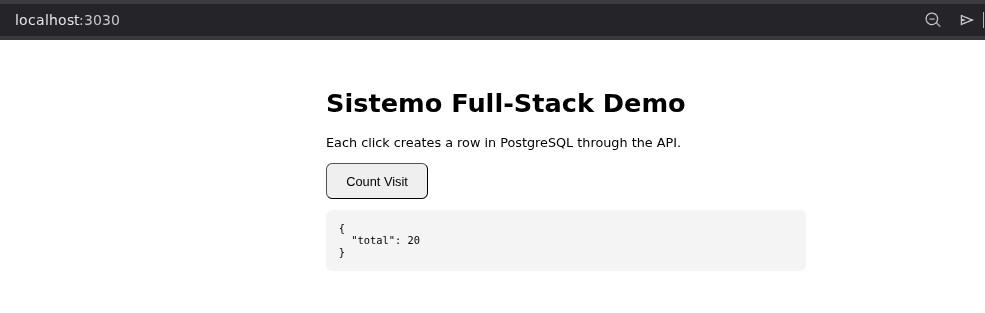
Open http://localhost:8080 in your browser. Click “Count Visit” — each click writes to PostgreSQL through the API.
# From the command line
curl http://localhost:8080                    # frontend HTML
curl http://localhost:3030/api/health         # API health check
curl http://localhost:3030/api/visits         # increment counter

sistemo machine list
After you deploy
You now have three microVMs on the private app network: PostgreSQL, the API, and Nginx. From your host, only two ports are published — everything else stays inside the machines.
- Frontend (Nginx):
http://localhost:8080— static UI;/api/*is proxied to the API machine. - API (Express):
http://localhost:3030— use/api/healthand/api/visitsfor checks. - Database: PostgreSQL listens on
:5432inside the db machine only — not forwarded to the host.
After you finish deploying, registry and built images are stored on disk under ~/.sistemo/images. You should see your pulled base image plus the API and web rootfs files you built:
ls -lha ~/.sistemo/images
total 1.2G
drwxr-xr-x 2 ds ds 4.0K Mar 22 20:29 .
drwxr-xr-x 8 ds ds 4.0K Mar 22 21:20 ..
-rw-rw-r-- 1 ds ds 512M Mar 22 17:45 debian.rootfs.ext4
-rw-r--r-- 1 ds ds 2.0G Mar 22 21:23 demo-api.rootfs.ext4
-rw-r--r-- 1 ds ds 2.0G Mar 22 21:24 demo-web.rootfs.ext4Operate
# SSH into any machine
sistemo machine ssh db
sistemo machine ssh api
sistemo machine ssh web

# Stop and start (port rules auto-restored)
sistemo machine stop api
sistemo machine start api

# View history
sistemo history
Cleanup
sistemo machine delete web
sistemo machine delete api
sistemo machine delete db
sistemo network delete app
Everything gone. No leftover containers, volumes, or networks.
| Feature | How it's used |
|---|---|
| Docker → machine | sistemo image build converts Docker images to bootable machines |
| Private networks | All machines on “app” network, isolated from default bridge |
| Port exposure | Host ports 8080 (web) and 3030 (api) exposed |
| Real systemd | API runs as a systemd service, survives restarts |
| Full Linux | apt, systemctl, SSH — standard Linux administration |